


Bitcoin miner BTC cloud mining
3.9139.00 Reviews
App Specs
- Version
- 12.0
- Updated On
- License
- Free
- Downloads
- 10,000+
- Developer
- Ebimar
- Categories
- Finance
- Platform
- Android
Screenshots
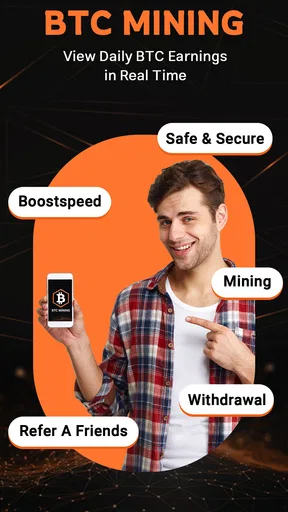
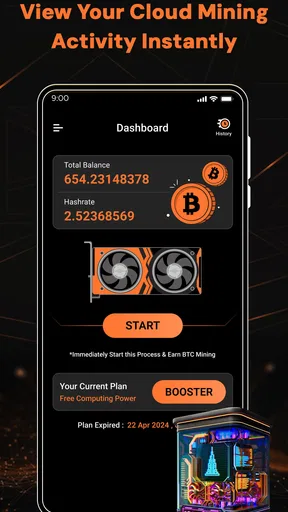
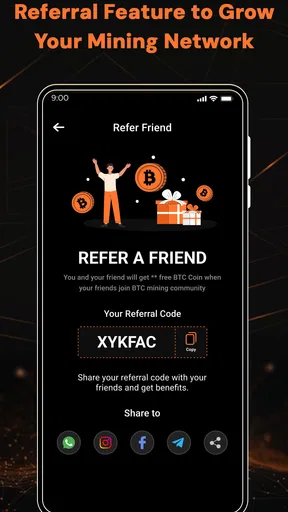
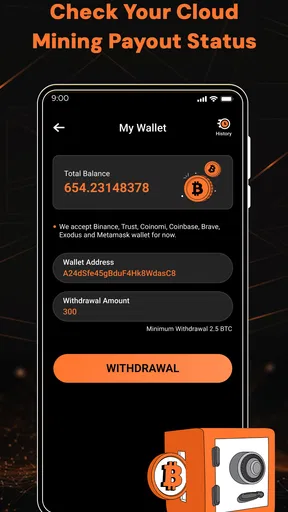
 Analysis by AppCompare
If you are curious about Bitcoin mining but do not want to begin by researching physical equipment, power use, and setup, Bitcoin Miner: BTC Cloud Mining looks like an approachable place to explore the idea. I would treat it as a tracking and learning tool, not as a shortcut to dependable income. The useful question is not simply whether a number on a screen rises; it is whether you understand what that number represents, what you have committed, and what you can do with the result.
That distinction matters with any cloud-mining app. The work is presented as remote rather than something your phone performs, so the phone is your window onto a service, not a pocket-sized mining machine. If you are comfortable keeping that separation in mind, the app may help make the process easier to follow. If you expect your phone itself to generate Bitcoin through ordinary use, this is the wrong mental model.
Start with a clear goal, not an earnings target
I would open the app with a modest purpose: to understand how a mining dashboard presents activity and estimated returns. Ebimar’s finance app is free to install, has an Everyone age rating, and is at version 12.0. Its focus is narrow, which can be a plus if you only want to watch mining-related figures, but it is not a substitute for a general budgeting app, an exchange, or a wallet.
Before choosing anything that asks for money, decide what you want to learn. Are you checking how an estimate changes over time, exploring cloud mining as a concept, or hoping to build a meaningful source of income? Those are very different goals. I would use the first two to guide a cautious trial; I would not treat a displayed estimate as a promise that a particular amount will arrive.
A practical routine for following the numbers
A sensible workflow starts with observation. Open the dashboard at a consistent point in your day, note what it shows, and compare it with your previous check rather than reacting to every notification. That small habit can help you distinguish ordinary movement in an estimate from a change that deserves attention. It also keeps the app from becoming a reason to check your phone constantly.
For example, imagine checking the app during a lunch break after reviewing your monthly bills. You can see whether the displayed mining activity has changed, then leave it alone until your next planned check. If you are considering a paid option, pause before proceeding and work out how that cost fits your personal budget. A potential return should not be counted as money available for rent, groceries, or debt payments.
There is a useful distinction between tracking and verifying. A dashboard can help you follow the figures it presents, but responsible decision-making means keeping your own notes about when you checked, what you selected, and what you spent. That gives you a reference if an amount looks different later, and it prevents a series of small in-app decisions from becoming hard to reconstruct.
Worth Reading Before You Choose

Switching to Android Auto Means Rethinking Your Driving Routine

Google Calendar Makes a Crowded Week Easier to Manage

Baby Panda World Brings Quick Play to Modern Phones, but Its Game Library Feels Busy

ESPN’s Live Game View Makes Following Close Games Easier

QuizzLand Review: A Good Fit for Short Trivia Breaks, Not Every Player

Basketball Stars: Multiplayer Is Fast, but Can It Recover When Matches Go Wrong?
What the app can and cannot replace
Compared with managing mining hardware yourself, cloud mining is presented as the less hands-on route: you are not setting up a rig on your phone or managing the physical equipment through it. That convenience comes with a trade-off. You have less direct involvement in the underlying operation, so the app’s display should not be confused with independent proof of mining performance or a guaranteed payout.
Compared with a typical cryptocurrency wallet, the emphasis here is mining earnings and estimated profit rather than simply storing or sending coins. Compared with an exchange, it is not the same kind of tool for buying and selling assets. If your real need is to hold Bitcoin, make transfers, or see a wider portfolio, a dedicated wallet or portfolio tracker may fit better. If your goal is to learn how estimates are presented in a cloud-mining workflow, this app is closer to the subject you are exploring.
That is also why I would not use it as my only record of financial activity. Keep important transaction details and personal budgeting outside the app, and do not assume that a screen showing an estimate answers questions about withdrawal conditions, fees, or the value you could ultimately receive. Read any terms shown before committing funds, and make sure you understand the steps between an in-app figure and money or Bitcoin you can actually access.
Who is likely to find it useful
The app makes the most sense for a curious beginner who wants a focused view of mining-related earnings without operating hardware. It may also suit someone who already follows cryptocurrency and wants a separate place to monitor cloud-mining estimates. The store shows a 4.3 average from 357 ratings, with 10K+ installs, which suggests that other users have tried it, but popularity alone cannot tell you whether its terms match your needs.
I would skip it if you need predictable returns, want a guaranteed source of income, or are uncomfortable with the uncertainty of cryptocurrency-related services. It is also a poor fit if you prefer to control every step of a mining operation yourself. In those cases, learning through independent educational material, comparing hardware costs on paper, or using a conventional finance tracker may be more useful than starting with a cloud-mining plan.
One practical tip is to decide on a stop point before exploring any paid choices. Set a personal spending limit you can afford to lose, and do not raise it just because a dashboard looks encouraging. Another is to check the app only at planned intervals; frequent refreshing can make small estimate changes feel more meaningful than they are. These habits do not change the underlying risk, but they help keep curiosity from turning into impulsive spending.
There is also a useful handoff to think through: the app may show activity, but your next decision could involve another service or account. Before moving anything, confirm where the asset is supposed to go, what information you are sharing, and whether you understand the receiving service. Treat each handoff as a separate choice rather than assuming that a mining balance, a wallet balance, and cash in your bank account are interchangeable.
Bitcoin Miner: BTC Cloud Mining is free to download, though it offers in-app purchases priced from $15.99 to $114.99 per item. That range is a reason to slow down and read each purchase screen carefully, not a reason to assume that a higher-priced option will produce a proportionally higher return. I would compare the cost with the exact benefit described in the app and avoid spending based on projected profit alone.
The broader context is worth keeping in view too. Cloud mining shifts the practical work away from your device, but it also means you depend on the service and the way it reports activity. That is different from running equipment you can inspect, and different again from buying Bitcoin directly. None of those choices is automatically right for everyone; the best fit depends on whether you value convenience, direct control, or simple exposure to the asset.
Questions about what happens after an estimate appears are worth resolving before you put money in. Check what the app says about withdrawing, any minimums or charges it presents, and how an amount is converted or transferred. If you cannot explain the route from the displayed figure to an asset you can access, wait rather than guessing. A clear understanding of the exit path is just as important as knowing how to start.
As a finance app developed by Ebimar, it sits in a category where clarity and restraint matter more to me than a busy screen. The product has 162 reviews, but I would read recent user feedback for recurring concerns rather than treating the overall average as a guarantee of an individual experience. The app is rated for Everyone, yet the financial decisions around it still call for adult judgment and careful reading.
My overall view is that this is best approached as a narrow tool for observing a cloud-mining workflow, not as a complete crypto-finance solution. Its focused purpose can make it easier to follow mining-related figures, while the main friction is the gap between an estimate on a screen and an outcome you can actually use. Keep spending decisions separate from hopeful projections, check terms before any commitment, and choose another tool if you need a wallet, exchange, or dependable income plan.
Ever found yourself daydreaming about striking it rich with cryptocurrencies? Well, let me introduce you to Bitcoin Miner: BTC Cloud Mining, an app that promises to be your golden ticket into the world of crypto mining, all from the comfort of your smartphone. Buckle up, as I dive into my experience with this intriguing app.
First Impressions: Easy Entry into the Crypto World
Right off the bat, the app greets you with a sleek and user-friendly interface. No need to be a tech whiz to navigate through it. The sign-up process is a breeze, requiring just a few taps before you're all set to start mining. What caught my attention was the app’s promise of simplicity—no bulky hardware or sky-high electricity bills. It’s like having a mini mining rig right in your pocket.
How It Works: The Nuts and Bolts
So, how does this magical process work? Bitcoin Miner: BTC Cloud Mining lets you earn cryptocurrency by utilizing cloud mining services. This means the heavy lifting is done remotely, and you reap the benefits. You select a mining plan, and the app does the rest. It's almost like having a personal assistant who mines coins on your behalf!
The app offers various plans catering to different investment levels. Whether you're a cautious newbie or a daring investor, there's something for everyone. I started with the basic plan to test the waters, and it gave me a good feel of the app's capabilities.
Features That Stand Out
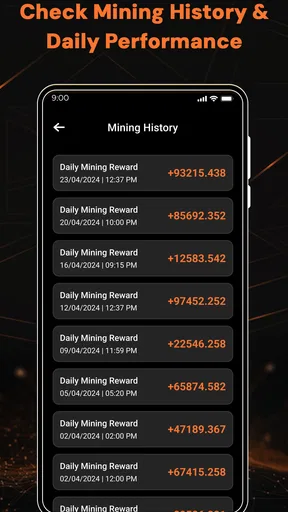
One of the features I found particularly nifty is the real-time dashboard. You can track your earnings and see how much crypto you've mined. It’s like having your own personal stock ticker, but for Bitcoin. The app also sends timely notifications about your mining status, keeping you in the loop 24/7.
Another highlight is the referral program. By inviting friends, you can boost your mining speed—essentially getting more bang for your buck. It’s a win-win if you ask me.
The User Experience: Smooth Sailing or Rocky Road?
Using the app was a generally smooth experience, with a few minor hiccups. On occasion, the app lagged slightly when loading my dashboard, but nothing that a quick refresh couldn't fix. Overall, the seamless design and ease of use make it accessible to both beginners and seasoned crypto enthusiasts alike.
Customer support is also worth mentioning. They’ve got a responsive team ready to tackle any issues or questions you might have. It's comforting to know that help is just a few taps away.
Security: Keeping Your Coins Safe
Security is a big deal in the crypto world, and thankfully, the app takes this seriously. It employs robust encryption to keep your data safe and sound. Plus, with two-factor authentication, you can sleep easy knowing your account is secure. In my book, peace of mind is invaluable, especially when dealing with digital currency.
Final Thoughts: Is It Worth the Hype?
So, is Bitcoin Miner: BTC Cloud Mining the real deal? In my experience, it offers a solid entry point for anyone looking to dip their toes into the crypto mining pool. While it's not a get-rich-quick scheme, it does provide a steady stream of earnings with minimal effort. Just remember, like any investment, there are risks involved, so tread carefully.
All in all, if you're curious about cloud mining and want to explore the world of cryptocurrencies without breaking the bank, this app is definitely worth checking out. Give it a whirl, and who knows? You might just strike digital gold.
Pros
- User-friendly interface for easy navigation.
- No hardware required for mining.
- Supports multiple cryptocurrencies.
- Real-time mining statistics and updates.
- Offers a free trial for new users.
Cons
- Requires stable internet connection.
- Potential for app-related security risks.
- Limited customer support options.
- In-app purchases can be expensive.
- Mining rewards may vary significantly.
FAQs for Bitcoin miner BTC cloud mining
Is Bitcoin Miner BTC Cloud Mining free to use?
Bitcoin Miner BTC Cloud Mining offers a free tier, but to maximize your mining potential, you may need to consider in-app purchases or subscription plans. These options provide enhanced features and increased mining speed, allowing users to earn more efficiently. Always review the cost details before making any purchases.
How does Bitcoin Miner BTC Cloud Mining work?
The app allows users to mine Bitcoin through cloud servers, eliminating the need for expensive hardware. Users can simply register, select a mining plan, and start mining. The app handles the complex calculations on its servers, providing a user-friendly interface for monitoring progress and earnings.
Is Bitcoin Miner BTC Cloud Mining safe and legitimate?
While the app is designed to offer a convenient mining experience, users should exercise caution. Always verify the app's legitimacy through user reviews and ratings. Additionally, ensure that the app adheres to security protocols to protect your data and earnings from potential fraud or cyber threats.
What devices support Bitcoin Miner BTC Cloud Mining?
Bitcoin Miner BTC Cloud Mining is available on both Android and iOS platforms. It requires a stable internet connection and a device running the latest operating system version for optimal performance. Always check for updates to ensure you have the latest features and security patches.
How do I withdraw my earnings from Bitcoin Miner BTC Cloud Mining?
Earnings can typically be withdrawn to your Bitcoin wallet once you reach a minimum threshold specified by the app. The process usually involves linking your wallet address to the app and following the withdrawal instructions. Be sure to check the app for any associated fees or withdrawal conditions.


